
The average American spends 5.4 hours a day on their phone and millennials spend at least 5.7 hours a day on their phone according to zdnet.com. Because of this shift in behavior, small business owners must adapt and make sure that their website works on both desktop and smartphone devices. The answer is a responsive website design, but what exactly is a responsive website design?
A responsive website design will adjust the shape of your website to fit the different screen sizes and viewports to ensure a user-friendly experience. With a responsive website design your customers will be able to engage with your website regardless of what platform they are using.
What is Responsive Website Design? How it Works
A typical website is made up of a set of files. So each page of your website is actually a file. The contents of that file contain items such as HTML, images, text, and cascading style sheets which help to determine the look and design of a site. Now on a standard (non-responsive) website the set of files contains very little of no CSS. A responsive website design on the other hand contains a lot of CSS. That is because a responsive website design contains an alternative set of CSS files depending on the device being used to access the site. The site looks and ‘responds’ differently based on the device. So for example when someone is viewing the website on a desktop they see a menu that is horizontally aligned, while a person viewing the website from a mobile device sees a vertically aligned menu.
So Why Is a Responsive Website Design Important?
A typical website is made up of a set of files. So each page of your website is actually a file. The contents of that file contain items such as HTML, images, text, and cascading style sheets which help to determine the look and design of a site. Now on a standard (non-responsive) website the set of files contains very little of no CSS. A responsive website design on the other hand contains a lot of CSS. That is because a responsive website design contains an alternative set of CSS files depending on the device being used to access the site. The site looks and ‘responds’ differently based on the device. So for example when someone is viewing the website on a desktop they see a menu that is horizontally aligned, while a person viewing the website from a mobile device sees a vertically aligned menu.
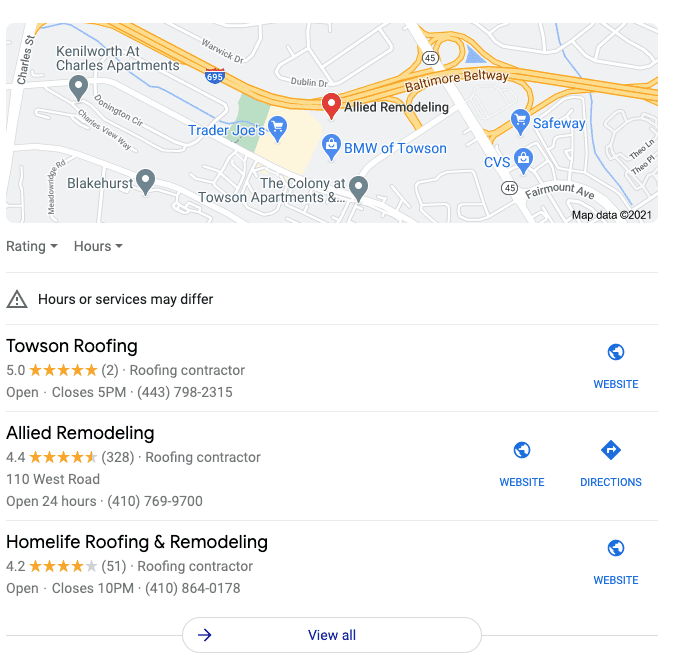
Now if you are wondering how these businesses got to the top 3 local search results for roofers near Towson, MD it is because of their search engine optimization strategies for roofers that they have been working on.
How Does Google Determine Rankings in the Local Pack?
Great question, and luckily a pretty straightforward answer. You see Google wants to make sure that it gives users results from local businesses, meaning the closest businesses to them. The closer your roofing company is to the person searching, the more likely your business will appear in Google’s local pack. Now there are a few addition ways that Google determines rankings in the local pack. They are
- Relevance – Does your company offer products and services that are relevant to the user searching? When your website and Google My Busines profile indicate that you perform the exact services a person is searching for, chances are you will appear much higher in search results.
- Distance – The closer you are to the end user, the closer you are to the top of the Google Local Pack.
- Prominence- Is your business well-known in the community? Does your online authority (domain authority, page authority, backlink profile, etc) reflect your real-world expertise?
All of these unique factors play a key role in how high a business ranks on Google Maps.
10 Steps to Get a Roofing Business to the Top of Google Maps
1. Add Your Business To Google Maps
It goes without saying, the first thing you need to do is add your business to Google maps. Below are the steps you need to follow in order to add your business successfully to Google Maps.
- Go to google.com/maps and search for your business name.
- If it appears in the drop-down menu with a location next to it, then you have a listing.
- If your business name does not appear you will see an option in the drop-down menu to add a missing place. Once prompted you will provide your name, category, and location.
2. Claim Your Google My Business Listing
Your second step should be to claim your Google My Business listing. By claiming your profile online you can provide Google with more information regarding your business. This will help you to rank higher on Google Maps.
3. Add Information to Your Google Maps Business Listing
The more information you add to your Google My Business Profile the better. Make sure to include relevant information like your business name, category, address, service area, hours of operation, special hours, phone number, website, products, services, attributes, and business description.
4. Add Photos to your Google My Business Listing
Google is a big fan of you contributing to your profile. So to improve your rankings in Google make sure to upload high-quality and compelling photos to your business.
5. Generate Google Reviews
Google ranks businesses with positive reviews higher versus companies that have a low ranking. Be proactive in asking for reviews from companies, and make sure to respond to all of them.
6. Verify You Only Have One Profile
A large part of rising in rankings is making sure that you only have one listing on Google. Make sure to find and remove duplicate listings and incorrect information from your profile.
7. Post Consistently
Like other social media platforms like Facebook and Instagram, make sure that you post regularly to your Google My Business Profile. Regular posts will send signals to Google that you are proactively managing your listing, and will help with your overall ranking.
8. Make sure your website is responsive
It is so important to have a responsive website in today’s day and age. Nearly 60% of all searches occur on a mobile device according to Moz so make sure that your website does not have any broken links, requires pinching or zooming in, or is slow to load. Your ranking in Google Maps will suffer if it does.
9. Add local keywords to your website
Another way to boost your presence in Google Maps is to focus on your local SEO strategy within your website. So be sure to incorporate location-based keywords on the main pages of your website such as your homepage, about us page, contact us page, and more. By emphasizing that you are a local business, search engines will feel more confident in ranking your business higher in local listings.
10. Embed a Google Map on Your Website
Finally, if you want to rank higher on Google search results, make sure to embed a map on your website. Embedding a Google Map on your site tells Google where your business is located and helps to boost your performance.
Ready To Boost Your SEO Strategy?
If you are ready to dominate search results in your area, please contact MarketKeep today. As an SEO Company for Roofers we help you to plan, place, and optimize your digital marketing strategies to increase leads and sales.

